ProjectsRange Rover Lower Touch Screen
Range Rover Lower Touch Screen
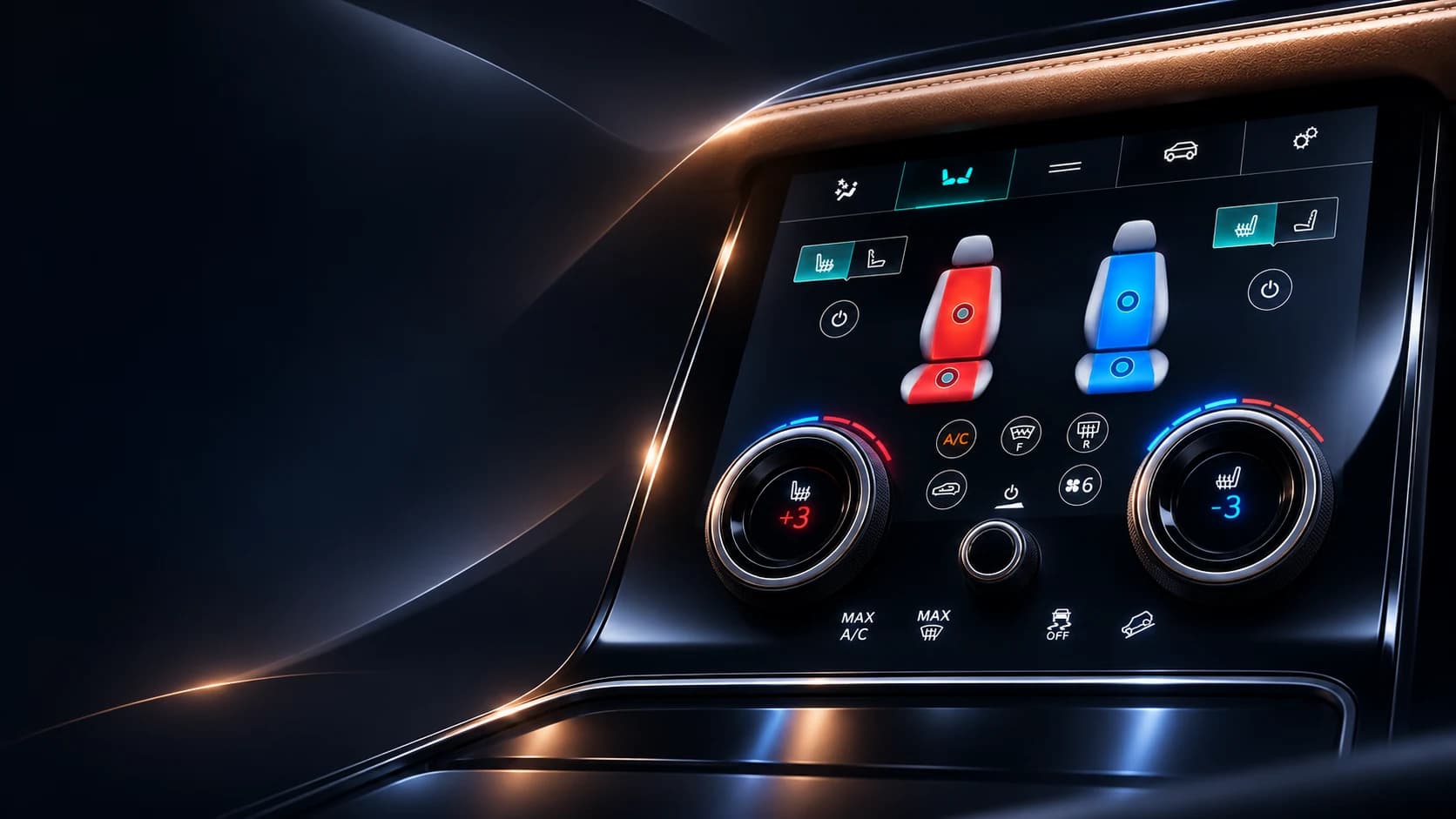
Climate, seat heating, ventilation, and massage controls on the Range Rover Velar lower screen.
- Role
- Frontend developer
- Stack
- Javascript · CSS · Grunt · Websocket · Git
- Period
- 2018
- Outcome
- In production Velar vehicles
Overview
Climate and seats on the lower screen.
Range Rover Lower Touch Screen is an application for the lower touchscreen in the Range Rover Velar. I worked on its frontend at Harman, where our team developed the project for Range Rover.
The task
The lower screen in the Range Rover Velar lets the driver and passenger adjust the climate, turn on seat heating or ventilation, and choose a massage mode.
My task was to implement these screens: handle touch input, switch between modes, and display the current settings. The touchscreen controls also needed to work with the rotary dials below the display.
What I had to account for
The application supported more than 100 vehicle configurations. Cars came with different equipment and features, so the interface had to account for each combination.
- Separate settings for the driver and passenger.
- Indicators that show which functions are on and the level selected.
- Access to the main climate settings without going through several menus.
- Touch controls that work alongside the rotary dials.
- Support for right-hand-drive vehicles in countries with left-hand traffic.
- Localization for languages around the world, including right-to-left (RTL) scripts.
How the screens work
Climate, Seats, Vehicle, and Settings sit at the top of the screen and stay in the same order when switching sections. The seat illustrations show which side a function is active on and the level selected.
Temperature readings and seat settings sit next to the corresponding rotary dials. Massage modes open in a separate panel while the main seat settings stay on screen.
Buttons and labels
When a function is on, its control changes color, outline, and icon. Labels help show what is selected. The driver and passenger settings stay in the same positions across screens.
I also had to account for the viewing angle and cabin lighting: selected modes and labels needed to remain visible.
Result
The application is used in production Range Rover Velar vehicles. The driver and passenger can each adjust their own seat heating, ventilation, and massage settings.
Visual showcase
Results
- 60 FPS
- Frame rate
- <100 ms
- Touch response
- <2 s
- Startup time
- RTL
- Right-to-left layout
Let's talk
Let's build something.
Have a project in mind or just want to say hello? I'm always up for a good conversation.
Let's talk